Moliga Font Review for Marketers and Designers
It was a typical morning — the campaign deadline loomed, and I needed a font that could deliver both visual impact and a subtle retro charm. The client had just approved a new product launch with a mid-century aesthetic, and I knew finding the right typeface would be key to nailing the vibe. That’s when I discovered Moliga, a sans serif font that blends a bold presence with a nostalgic touch. As someone who regularly works across digital platforms like Instagram, YouTube thumbnails, and email banners, I put Moliga through its paces in real-world scenarios. Here’s how it performed.
Moliga for Product Teasers with Mid-Century Flair
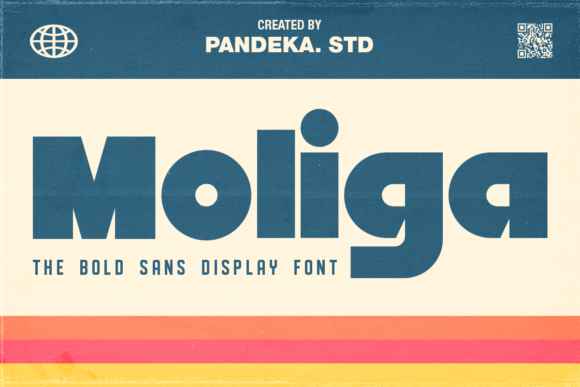
I started by designing a teaser graphic for an upcoming lifestyle product drop. The brand wanted something clean but with a hint of old-school sophistication. Moliga immediately stood out due to its big x-height and small ascender design. This unique combination gives the font a compact yet powerful feel, perfect for short headlines or taglines that need to catch attention quickly.
In this case, I used Moliga as the main display typeface for the teaser title. Its heavy sans serif style added weight and authority without feeling overly aggressive. The contrast between thick strokes and subtle character shaping gave the visuals a warm, approachable look that aligned perfectly with the campaign’s personality. It read well on mobile previews and even in thumbnail form — a big plus for social media visibility.
Moliga in Social Media Graphics: First Impressions Count
Social feeds are fast-moving, and fonts have mere seconds to make an impression. I tested Moliga in a series of Instagram posts for a content marketing campaign promoting a new blog series. Each post had a short headline and a supporting line of text. Moliga worked exceptionally well as the headline font because of its strong visual hierarchy and clear letterforms.
The large x-height made the text feel more present and legible at smaller sizes, which is crucial when users scroll past your content on their phones. For the body copy, I paired it with a lighter sans serif font to maintain balance. This pairing helped keep the focus on the message while allowing Moliga to shine as the hero text. The result was a cohesive and stylish look that felt modern enough for today’s audience while subtly nodding to a classic era.
Moliga for Email Banners and Webinar Headers
Email campaigns often rely on bold, concise messaging to drive engagement. In one recent project, I used Moliga for the subject line and banner text of a webinar announcement. The font’s heavy touch gave the email a sense of urgency and importance, while the mid-century undertones added a layer of trust and timelessness — great for professional audiences.
One thing I noticed was that Moliga’s small ascender meant it didn’t extend too far above the baseline, keeping the overall height of the text tight. This made it ideal for email headers where space is limited. Just be sure to check if the font includes enough weights and alternates for variations in your campaign assets. Some promotional emails may require bolder styles or different character sets depending on the platform.
Moliga in YouTube Thumbnails and Reels Covers
YouTube thumbnails and Reels covers are all about grabbing attention in under a second. I applied Moliga to a set of thumbnails for a YouTube channel focused on vintage fashion tips. The goal was to create a consistent visual language that echoed the channel’s theme.
Moliga delivered exactly what I needed — a confident, readable display font that looked good over video clips and background imagery. The lack of serifs allowed it to remain crisp on dark backgrounds, and the bold weight ensured visibility even in small preview sizes. For Reels covers, I paired it with a minimalist layout to avoid cluttering the screen. The font’s character spacing made it easy to adjust for tight layouts, and the included ligatures gave a polished finish to longer titles.
Moliga for Branding and Logo-Style Text
Moliga isn’t just for headlines or thumbnails — it has serious potential for branding applications. I experimented with using it as part of a brand identity refresh for a boutique online store. The client wanted something that felt premium but not pretentious. Moliga fit the bill perfectly.
Its mid-century feeling lent a sense of nostalgia without being outdated. The heavy stroke contrast and compact proportions made it work well as a logo-style font, especially when layered with simple iconography or photography. It also paired nicely with a softer script font for taglines, creating a balanced and memorable typographic system. If you're looking to build a brand around simplicity and strength, Moliga is worth considering.
Moliga and Readability in Fast-Scrolling Feeds
When working with fonts for digital campaigns, readability is everything. I tested Moliga in a Pinterest campaign promoting a curated list of home decor ideas. Pinterest is image-heavy and relies heavily on visual storytelling, so the text overlay must be legible at a glance.
Thanks to its large x-height and open apertures, Moliga held up well on high-contrast overlays. Whether placed over a bright photo or a muted background, the letters remained distinct and easy to read. However, I found that using it for long paragraphs or detailed descriptions wasn’t advisable. It shines best in short bursts — headlines, callouts, and branded labels — rather than blocks of text.
Practical Font Pairing Tips for Moliga
To get the most out of Moliga, consider pairing it with complementary fonts that enhance its strengths. For editorial or packaging designs, I recommend matching it with a clean sans serif font for secondary text. If the campaign leans into a more sophisticated tone, a soft slab serif can add depth without clashing.
- Modern Sans Serif: Great for balancing Moliga’s boldness with subtlety.
- Handwritten Script: Adds warmth and contrast for taglines or quotes.
- Classic Serif: Useful for print-based promotions or luxury branding.
Font pairing is all about contrast and harmony, and Moliga offers just the right amount of character to make those combinations pop. Always test your pairings in actual campaign mockups to see how they perform in context.
When Not to Use Moliga
While Moliga is a versatile display font, it does have limitations. It’s not designed for long-form reading, so avoid using it for website body text or lengthy email copy. Its compact structure makes it excellent for logos and headlines, but it lacks the breathing room needed for dense information.
If your campaign involves tiny text — think QR codes, product tags, or small print in a brochure — Moliga might not be the best choice. The same goes for formal corporate communication where a more neutral or traditional sans serif font is expected. But for creative branding, promotional graphics, and social media visuals, it hits all the right notes.
What to Check Before Using Moliga in Campaigns
Before finalizing Moliga for a campaign, always verify the following:
- File formats: Does it include OTF, TTF, or WOFF for cross-platform compatibility?
- Commercial licensing: Can it be used in ads, templates, or merchandise?
- Alternates and ligatures: These can help refine the look for branding or special characters.
- Weights available: A range of bold, regular, and light options will give you more flexibility.
- Mobile optimization: How does it render on different devices and OS settings?
These checks are essential for ensuring your campaign doesn’t run into unexpected issues later. You want to avoid last-minute redesigns due to missing glyphs or incorrect licensing terms.
Moliga as Part of a Branded Template Pack
I recently created a template pack for a client launching an online shop. They wanted consistency across their Instagram feed, email headers, and landing page banners. I chose Moliga as the primary display font for its bold, confident look and ability to unify various elements under one stylistic umbrella.
Using Moliga across multiple touchpoints helped reinforce the brand’s identity without making it feel repetitive. The font’s heavy touch added energy to product titles, while the mid-century feel softened the overall tone compared to ultra-modern alternatives. The result was a cohesive yet dynamic set of visuals that customers responded to positively.
For template packs, I recommend including several versions of the font (bold, regular) and maybe some stylized alternates for differentiation. This allows clients to mix and match depending on the use case, from sale announcements to influencer collabs.
Moliga and Multilingual Support
Global campaigns need fonts that support multiple languages. I ran a quick test using Moliga in a multilingual ad layout targeting European markets. While the core Latin alphabet was solid, I did notice that certain accented characters weren’t fully optimized. If your campaign spans non-Latin scripts or requires extensive international use, double-check the font’s language coverage before finalizing.
This is especially important for e-commerce or travel brands that operate in diverse regions. Missing glyphs can break the flow of a message and affect user experience.
Final Takeaways for Campaign Designers
After putting Moliga through several real-life campaign tests, I’m confident it’s a strong contender for designers who want to blend modern functionality with a touch of retro flair. It’s a premium sans serif font that brings character without sacrificing clarity — a rare combo in the world of display typography.
Whether you’re crafting a YouTube thumbnail, building a brand identity, or preparing a seasonal sale graphic, Moliga adds a level of intentionality to your visuals. It’s not a background font — it’s a spotlight font. And in marketing, that’s exactly what you want for your headlines, logos, and campaign labels.
So next time you’re brainstorming a fresh look for your digital campaign, consider Moliga. It might just become your go-to creative font for turning heads and building brand recognition.