Beatty Font: A Modern Classic for Designers
I recently found myself in the middle of a branding project for a local artisanal bakery. The client wanted something timeless yet contemporary—something that felt like it could work across their packaging, website, and social media but still stood out. I opened my font library with a blank brand board and started testing typefaces. That’s when I stumbled upon Beatty, a serif typeface that immediately caught my eye. What followed was an afternoon of experimentation, and by the end, I knew Beatty was the right choice for this project.
Beatty for Logo Design and Brand Identity
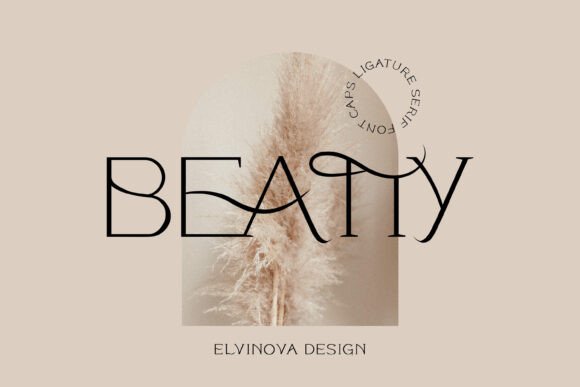
As a display font, Beatty is incredibly versatile in logo design. Its clean lines and subtle serifs give it a refined look without feeling overly formal. I used it for the bakery's logo, and the contrast between its structured uppercase characters and soft curves gave the brand a warm, approachable identity while maintaining professionalism. It didn’t scream “I’m fancy,” but it definitely whispered, “I’m trustworthy.”
One thing I noticed quickly is that Beatty works best when used sparingly in a logo. Because it’s a display typeface, it needs space to breathe and shouldn’t be overused in long phrases or subheadings. For instance, using it for the shop name alone on the signage worked beautifully, whereas adding too many details around it made the design feel cluttered.
Beatty in Packaging and Product Labels
I layered Beatty into the bakery’s product labels next. The uppercase nature of the font helped create visual consistency across different packaging types—whether on a box label, a bag tag, or a jar sticker. The font’s personality shone through especially well on minimalist backgrounds where it became the focal point.
What I appreciated most was how easily it translated from digital mockups to physical print. The weight distribution and x-height are just right for small-scale printing, ensuring legibility even on compact surfaces. However, if you're designing for something like a grocery shelf with very tiny text, Beatty might not be your best bet. It’s more at home in bold, impactful statements than in dense body copy.
Using Beatty for Social Media Graphics
Social media layouts were another area where Beatty impressed me. On Instagram posts promoting weekend specials, it added a touch of elegance that matched the brand’s aesthetic perfectly. I paired it with a lighter sans-serif for supporting text, which balanced the overall composition nicely.
- Instagram post headers looked polished with Beatty as the headline.
- Its modern classic vibe fit well with food photography and lifestyle content.
- It helped elevate the perceived quality of the brand in a subtle way.
For platforms like Facebook or LinkedIn, I’d recommend using it more cautiously. These spaces often require quick readability and less stylization. But for Pinterest-style visuals or influencer collaborations, Beatty feels just right.
Beatty for Wedding Invitations and Event Branding
While working on a wedding branding layout for a friend’s event, I swapped out a more traditional serif and tested Beatty instead. The result? A fresh take on classic wedding typography. Its uppercase letters gave a sense of formality and celebration without being too old-fashioned.
Here’s what stood out:
- The font has enough character to make guests pause and admire the design.
- It pairs well with floral accents and hand-drawn illustrations.
- Despite being all caps, it doesn’t feel aggressive or shouty—it reads smoothly and warmly.
That said, I wouldn’t use Beatty for the entire invitation suite. While it’s great for titles and highlights, it can become fatiguing in longer sections like seating charts or program notes. Still, as an accent or headline font, it brings a unique charm to event branding that’s hard to replicate.
Font Pairing Tips with Beatty
If you’re considering Beatty font for your next project, pairing it with the right companions is key. Here are some combinations I’ve found effective:
- With a Sans Serif: Beatty shines when paired with a modern sans-serif like Montserrat or Lato. This combo balances tradition with simplicity—perfect for web headers and brand boards.
- With a Script Font: Think of a delicate script like Great Vibes or Allura for signature touches or taglines. Beatty holds its own against more ornate styles, offering a grounded contrast.
- With Another Serif: Layering Beatty with a more traditional serif such as Playfair Display adds depth and hierarchy, especially useful in editorial layouts or luxury branding.
Avoid pairing it with overly decorative or highly contrasting fonts unless you have a strong visual reason. Beatty is elegant, but it doesn’t need to be overwhelmed.
Beatty as a Display Font in Web and Print Design
On the bakery’s homepage hero section, I placed Beatty as the main header. The moment I did, I saw a noticeable shift in the site’s tone. It felt more curated and intentional. As a display font, Beatty handles large sizes exceptionally well. It has a natural rhythm that makes it easy on the eyes, even when centered and bold.
In print, I noticed how it responded to texture and color treatments. Whether printed on matte paper or metallic foil, Beatty retained its clarity and presence. This adaptability is rare among Fonts in the display category, making it a reliable choice for creative studios looking to build a cohesive brand system.
When Not to Use Beatty
While Beatty is a standout in many scenarios, it’s not a one-size-fits-all solution. If your project requires long blocks of body text—like a blog post, magazine article, or legal document—this isn’t the font for you. Its uppercase-only format also limits flexibility in certain contexts, such as book titles or paragraphs with acronyms.
Additionally, if you’re aiming for a corporate or financial brand identity, Beatty may come off as too artistic or niche. It leans toward the craft and lifestyle markets, where warmth and creativity are valued over strict professionalism.
Testing Beatty Before Finalizing Your Project
Before committing to Beatty for a client, I always do a few quick tests:
- Print a sample business card and hold it up to light to check ink bleed and sharpness.
- Place it in a short phrase (like a slogan) and see how it flows with other elements.
- Test it in multiple colors and backgrounds to ensure legibility and contrast.
I also suggest applying it to both digital and print formats. Since it’s a premium font, you’ll want to make sure it aligns with your client’s vision before finalizing any deliverables. One thing to note is that Beatty doesn’t include lowercase letters, so it’s important to consider how that affects your message’s tone and style.
Commercial Use and Licensing Considerations
Like any Fonts used in professional work, it’s crucial to verify licensing before deployment. If you plan to use Beatty in client projects, templates, websites, or merchandise, make sure you have the appropriate commercial license. Some free versions may restrict usage to personal or non-commercial applications only.
Also, if you're building a full brand identity system, double-check whether the font includes alternates, ligatures, or special characters. These small details can add polish and help maintain consistency across all design assets.
Final Thoughts on Beatty’s Place in Your Toolkit
After several rounds of real-world testing, I can confidently say that Beatty is a solid addition to any designer’s font collection. It’s not just a pretty face—it brings purpose and personality to branding work. Whether it’s sharpening a logo draft or elevating a social media layout, Beatty delivers a modern classic appeal that’s both stylish and functional.
So if you're looking for a serif typeface that stands out without shouting, gives your designs a bit of soul, and fits naturally into the Display category, Beatty is worth a closer look. Just remember to test it, pair it wisely, and respect its intended use cases. You might find yourself reaching for it more often than you expect.